Best Web Hosting for n8n (2026): 7 Options Compared by Workload
n8n is not a website. It is a server process that has to stay awake 24 hours a day, listening for webhooks and firing schedules. That one fact rules out most "web hosting" plans, and it is why the right n8n host looks very different from the right WordPress host.
This guide compares the hosting options that actually run n8n well in 2026, with real plan specs, the renewal prices most lists hide, and the setup details (database, backups, HTTPS, security) that decide whether your automations keep running.
Quick verdict: for most people, the best web hosting for n8n is Hostinger's KVM 2 VPS. It has 2 vCPUs and 8 GB of RAM, a one-click n8n template, and costs $8.79 a month on a 24 month term (renews at $14.99).
What is the best web hosting for n8n?
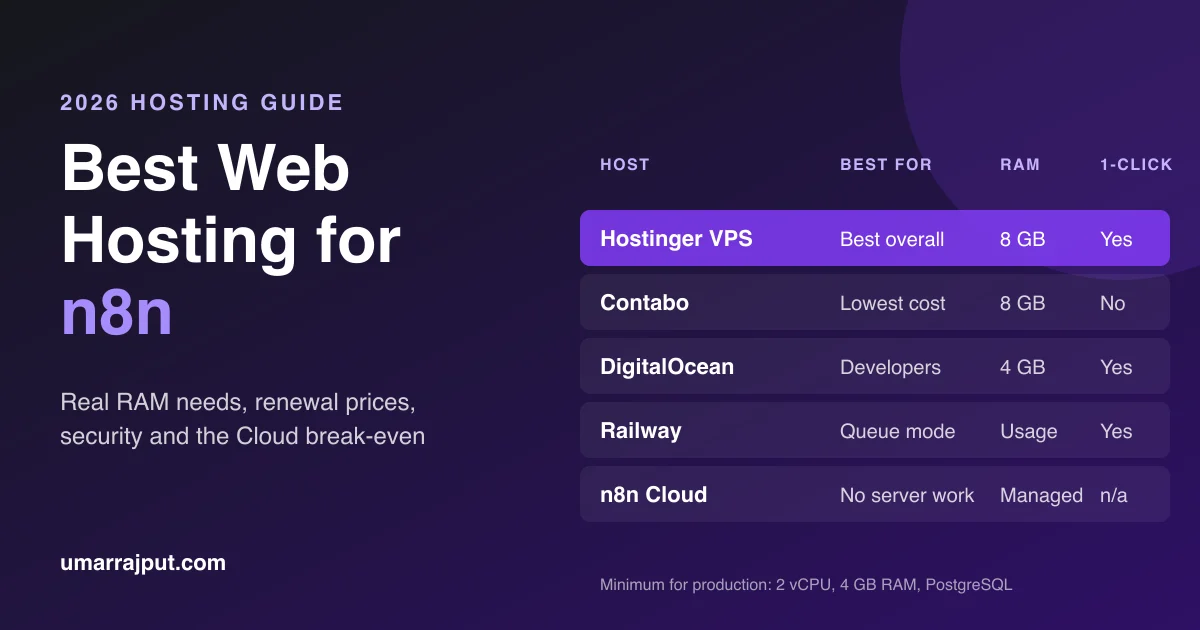
The best web hosting for n8n is a Linux VPS with at least 2 vCPUs and 4 GB of RAM, running n8n in Docker with a PostgreSQL database. Hostinger is the best overall pick for its one-click n8n template and 8 GB plan under $9 a month. Contabo is cheapest on raw specs, and n8n Cloud suits teams under 10,000 executions a month.
Shared hosting is the wrong tool. n8n needs a process that stays running to fire schedules and catch webhooks, and shared plans stop long running processes. Some cPanel hosts with Node.js support can be forced to run it, but it breaks quietly, which is the worst way for automation to fail.
Best n8n hosting in 2026: quick comparison
| Host | Best for | Plan for n8n | Price (intro / renewal) | One-click n8n | Skill needed |
|---|---|---|---|---|---|
| Hostinger VPS | Best overall, beginners | KVM 2: 2 vCPU, 8 GB RAM, 100 GB NVMe | $8.79 / $14.99 a month | Yes, 3 templates | Low |
| Contabo | Cheapest raw specs | Cloud VPS 10: 4 vCPU, 8 GB RAM | About €4.40 / €5.50 a month | No | Medium to high |
| DigitalOcean | Developers who will scale | 4 GB Droplet | $24 a month | Marketplace image | Medium |
| Hetzner Cloud | EU data, if you already use it | CPX22: 2 vCPU, 4 GB | About €19.49 a month after June 2026 | No | High |
| Railway | Queue mode without a server | Editor + worker + Postgres + Redis | About $10 to $25 a month, usage based | Template | Low |
| n8n Cloud | No server work at all | Starter or Pro | €20 or €50 a month (annual) | Not needed | None |
| Pakistani VPS | PKR billing | 4 GB RAM | PKR 2,999 to 3,800 a month | Some providers | Medium |
Hostinger prices are from its n8n hosting page in November 2026 on a 24 month term, paid upfront. Other prices are from 2026 pricing trackers and change often, so check before you buy.
How I compared these n8n hosts
I compared each option on the six things that decide whether n8n runs well, not on generic web hosting scores:
- RAM per dollar, because memory is n8n's main limit
- Renewal price, not only the first term
- n8n setup: one-click template, Docker, or fully manual
- Backups and snapshots, and what they cost
- Data centre locations, including Asia for readers in Pakistan and the Gulf
- Room to grow into PostgreSQL and queue mode
Specs and prices come from each provider's page or 2026 pricing trackers, and n8n requirements come from n8n's official documentation.
1. Hostinger VPS: best web hosting for n8n overall
Hostinger is the best web hosting for n8n overall because it combines a one-click n8n installer, 8 GB of RAM on its KVM 2 plan for $8.79 a month, and Asian data centres in India, Indonesia and Malaysia. You get self-hosted n8n with unlimited workflows and executions for less than half the price of n8n Cloud Pro.
Most 2026 reviews put Hostinger first or second for n8n, and the reason is practical: the template removes the Linux and Docker setup that stops most beginners.
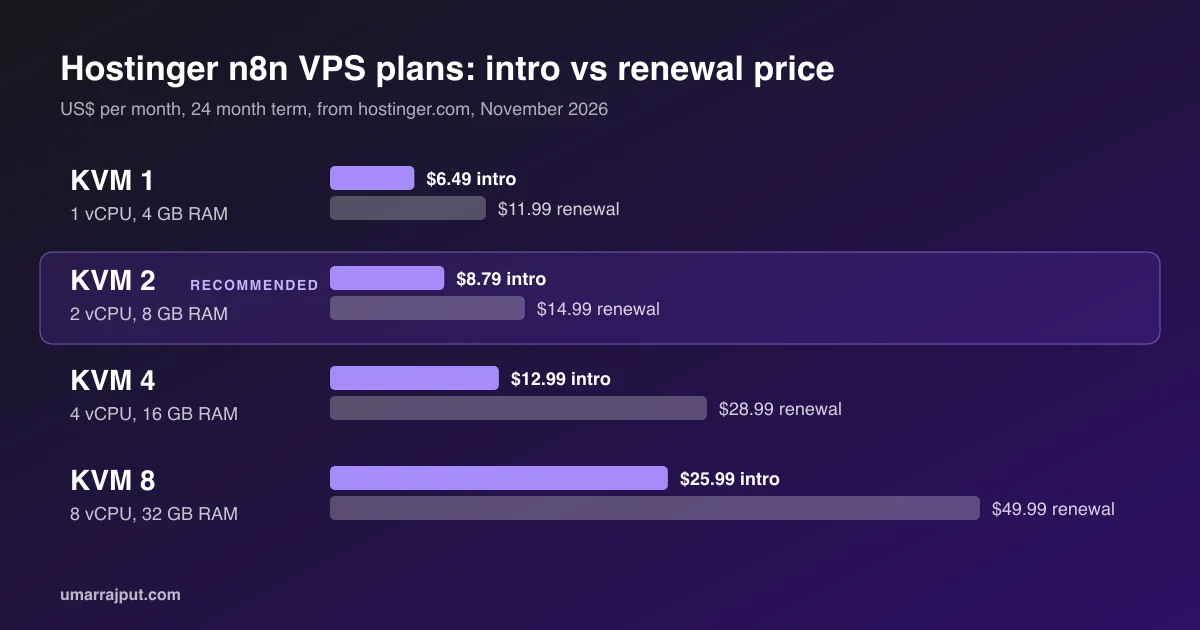
Hostinger n8n plans and prices (November 2026)
| Plan | vCPU | RAM | NVMe disk | Intro price | Renews at | Good for |
|---|---|---|---|---|---|---|
| KVM 1 | 1 | 4 GB | 50 GB | $6.49/mo | $11.99/mo | Learning, a few simple workflows |
| KVM 2 | 2 | 8 GB | 100 GB | $8.79/mo | $14.99/mo | Most businesses, AI agents |
| KVM 4 | 4 | 16 GB | 200 GB | $12.99/mo | $28.99/mo | Queue mode, heavy AI workloads |
| KVM 8 | 8 | 32 GB | 400 GB | $25.99/mo | $49.99/mo | High volume, many workers |
Prices are for a 24 month term paid upfront (KVM 2 is $210.96 today), from Hostinger's n8n page during its November 2026 sale.
Which Hostinger plan should you pick for n8n?
Pick KVM 2 for n8n unless you are only learning. KVM 1's 4 GB of RAM runs n8n, but one vCPU slows down AI and file-heavy workflows. KVM 2 doubles both for about $2.30 more a month, and leaves room for PostgreSQL. Move to KVM 4 when you need queue mode with several workers.
What you get with Hostinger's n8n hosting
- Three one-click templates: plain n8n, n8n with queue mode (listed as an add-on), and n8n with 100+ pre-made workflows
- Unlimited workflows and concurrent executions, plus community nodes, since it is self-hosted
- Hostinger Agent, an AI assistant in the panel that shows CPU, memory and disk use, manages firewall rules and SSH keys, and creates backups and snapshots
- Data centres in Europe, North and South America, and Asia (India, Indonesia, Malaysia)
- 30-day money-back guarantee, and a free domain for one year
Hostinger downsides to know before you buy
- The headline price needs a 24 month term paid upfront
- Renewal prices are roughly 70% to 120% higher than the intro price, so budget for the renewal
- The queue mode template is an add-on, not part of the base plan
- It is still an unmanaged VPS: updates to n8n and your workflows are your responsibility
How to set up n8n on Hostinger in 6 steps
- Choose a plan. Pick KVM 2 on Hostinger's n8n hosting page and pay for the term you want.
- Pick a location. Choose the data centre closest to the services n8n talks to most. From Pakistan or the Gulf, India or Malaysia usually gives the lowest latency.
- Select the n8n template. In the VPS setup, choose the plain n8n template, or the queue mode version if you expect high volume.
- Secure the server. Set a strong root password, then add an SSH key and turn on the firewall from the panel.
- Open n8n and create the owner account. Use the n8n link shown in your VPS dashboard, and save the login in a password manager.
- Add your own domain and a backup. Point a subdomain such as
n8n.yourdomain.comto the VPS, then take a first snapshot before you build anything.
Once it is running, follow the backup, security and update sections below. They apply to every host on this list.
2. Contabo: cheapest VPS for n8n on raw specs
Contabo is the cheapest way to get 8 GB of RAM for n8n. Its Cloud VPS 10 has 4 vCPUs and 8 GB of RAM for about €4.40 a month after a June 2026 price rise. The trade off is a fully manual setup with no n8n template, and less hand-holding than Hostinger or DigitalOcean.
- Pros: most RAM per euro, plenty of disk, monthly billing
- Cons: no one-click n8n, check setup fees and the current plan line at checkout
- Pick it if: you are comfortable with SSH and Docker and price matters most
3. DigitalOcean: best for developers who will scale
DigitalOcean is the best n8n hosting for developers who expect to grow, thanks to a Marketplace n8n image, clean documentation and a managed PostgreSQL option. It costs more per GB of RAM: $24 a month for 4 GB, $48 for 8 GB.
Backups are a paid add-on: weekly backups cost 20% of the Droplet price and daily backups 30%. On a $24 Droplet that is $4.80 or $7.20 a month on top.
- Pros: polished platform, managed databases, easy resizing
- Cons: about 3x Hostinger KVM 2 renewal price for the same 8 GB of RAM, backups extra
- Pick it if: you want managed add-ons and do not mind paying for them
4. Hetzner Cloud: good, but no longer the budget pick
Hetzner was the go-to cheap n8n host until 2026. After its June 2026 price change, the CPX22 (2 vCPU, 4 GB) is listed at about €19.49 a month, and the cheaper CX line has been unavailable to order in several reports. It is still fast and EU-based, but no longer cheap.
- Pros: strong performance, EU data residency, hourly billing
- Cons: big 2026 price rises, no n8n template, manual setup
- Pick it if: you already run servers on Hetzner or need EU-only hosting
5. Railway: easiest way to run n8n queue mode
Railway is the easiest way to run n8n in queue mode, because its template starts the editor, a worker, PostgreSQL and Redis as separate services. A small queue mode stack costs roughly $10 to $25 a month: about $5 each for the editor, worker and Postgres, and $2 for Redis.
- Pros: queue mode in minutes, no server to patch
- Cons: usage based bills can climb if a workflow loops, so set a spending limit
- Pick it if: you need workers and Redis but do not want to run them yourself
6. n8n Cloud: best if you never want to touch a server
n8n Cloud is the official hosted version, with no servers, updates or backups to manage. The Starter plan costs €20 a month on annual billing for 2,500 executions, and Pro costs €50 a month for 10,000 executions with 20 concurrent runs.
- Pros: zero maintenance, official support, always up to date
- Cons: execution limits, and costs jump sharply above 10,000 executions a month
- Pick it if: you run fewer than about 10,000 executions a month and value your time over cost
7. Pakistani VPS: for PKR billing and local support
A Pakistani VPS makes sense if you cannot pay in dollars or want support during Pakistan business hours. 2026 listings show 4 GB RAM plans from about PKR 2,999 a month, and at least one provider sells an n8n-ready VPS at PKR 3,800 a month.
Many businesses in Lahore, Karachi and Islamabad struggle with international card payments, and dollar prices move with the exchange rate. Before you buy, check three things: real dedicated RAM (not "burst"), root access, and whether the server is in Pakistan or resold from abroad.
Is there free hosting for n8n?
Free n8n hosting exists but is not reliable for real work. Oracle Cloud's Always Free tier offers ARM servers that can run n8n, but users report free instances being reclaimed without warning. n8n's own Cloud plans offer a trial, not a free tier. For anything a business depends on, a $6 to $9 VPS is the cheapest safe option.
The self-hosted n8n software itself is free. The Community Edition has unlimited workflows and executions, so the only cost is the server.
What most n8n hosting guides miss: sizing, database and backups
Most n8n hosting lists rank providers by intro price and stop there. The real decision depends on how much RAM your workflows use, whether you need PostgreSQL and queue mode, and how you recover when something breaks. Those decide the right plan more than the brand does.
How much RAM does n8n need?
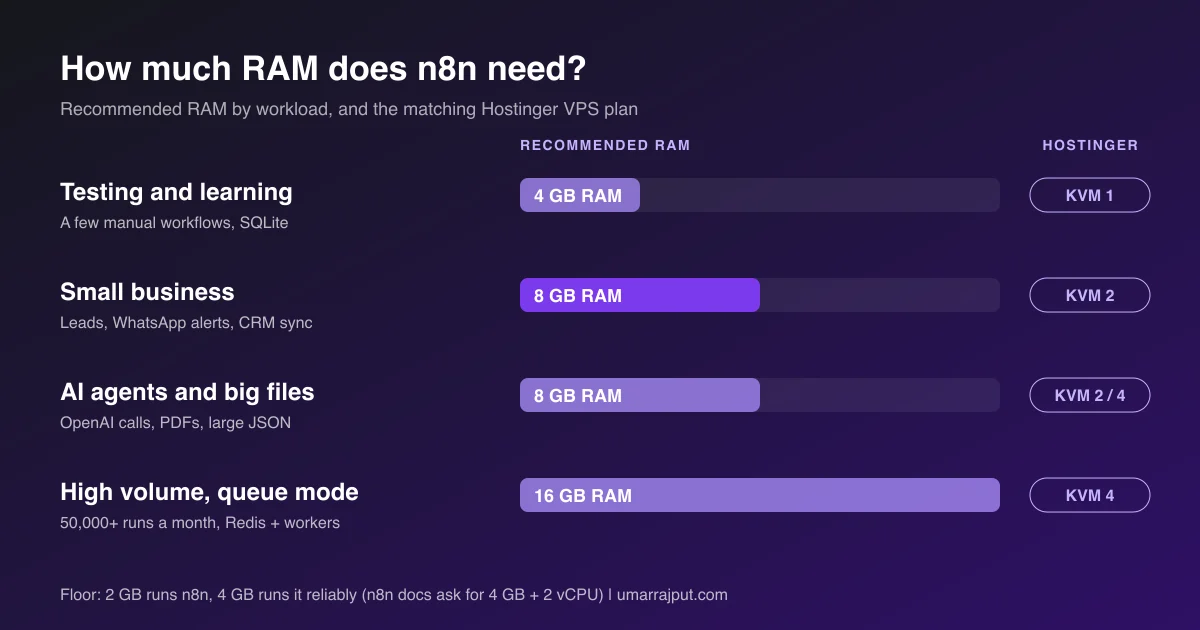
n8n needs 2 GB of RAM to run and 4 GB to run reliably. n8n's own Docker Compose guide asks for at least 4 GB of RAM and 2 vCPUs. Memory matters more than CPU, because n8n holds each workflow's data in memory while it runs.
| Your workload | Example | RAM | vCPU | Database | Hostinger plan |
|---|---|---|---|---|---|
| Testing and learning | A few manual workflows | 2 to 4 GB | 1 | SQLite is fine | KVM 1 |
| Small business | Lead forms, WhatsApp alerts, CRM sync, under 10,000 runs a month | 4 to 8 GB | 2 | PostgreSQL | KVM 2 |
| AI agents and big files | OpenAI calls, PDF parsing, large JSON, images | 8 GB | 2 to 4 | PostgreSQL | KVM 2 or KVM 4 |
| High volume | 50,000+ runs a month, many webhooks at once | 16 GB with queue mode | 4+ | PostgreSQL + Redis | KVM 4 |
AI workflows are the usual surprise. One agent that loads a long PDF and sends it to a model can use more memory than dozens of simple webhook flows.
PostgreSQL vs SQLite for n8n
n8n uses SQLite by default. The official docs say SQLite is fine for trying things out, but production instances that run around the clock should use PostgreSQL. Switch before you go live, because existing SQLite data does not carry over automatically.
When do you need n8n queue mode?
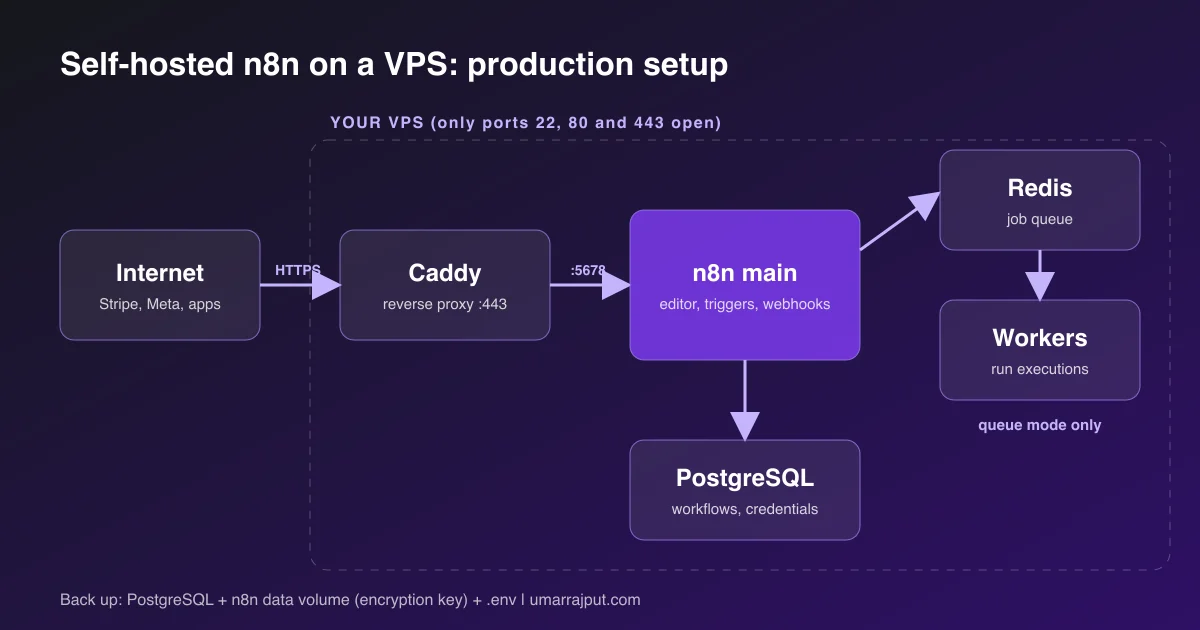
You need queue mode when executions start piling up or one slow workflow delays the rest. Queue mode splits n8n into a main instance that receives triggers and webhooks, plus workers that run executions, with Redis as the message broker. n8n does not recommend queue mode on SQLite, so it always means PostgreSQL plus Redis, and at least 8 GB of RAM in practice.
The backup most people forget: the encryption key
n8n encrypts every saved credential, such as API keys, WhatsApp tokens and Gmail logins, with an encryption key it creates on first launch. If you back up the database but lose that key, your workflows come back and every credential is unreadable.
Back up these three things, keep one copy off the server, and test a restore once:
- The PostgreSQL database (a nightly
pg_dumpis enough for most small setups) - The n8n data volume, which stores the encryption key, or set
N8N_ENCRYPTION_KEYyourself and keep it in a password manager - Your
docker-compose.ymland.envfiles
A VPS snapshot is useful before updates, but it lives with the same provider. Keep at least one backup somewhere else.
Webhooks need HTTPS and the right public URL
Most outside services, including Stripe, Meta and the WhatsApp Cloud API, only call HTTPS webhooks. Put n8n behind a reverse proxy such as Caddy, Traefik or Nginx with a free Let's Encrypt certificate, on a subdomain like n8n.yourdomain.com.
Then tell n8n its public address with N8N_HOST, N8N_PROTOCOL=https and the webhook URL variable (WEBHOOK_URL, or N8N_WEBHOOK_URL from n8n 2.30). If you skip this, n8n shows localhost webhook links that nothing outside the server can reach. n8n's docs advise a subdomain rather than a sub-path behind a reverse proxy.
Keep execution data from filling the disk
n8n saves every execution. It prunes by default, keeping finished executions for 14 days (336 hours) or up to 10,000 executions, whichever limit is hit first. With busy AI workflows on a small disk, lower EXECUTIONS_DATA_MAX_AGE if you do not need two weeks of history.
n8n security checklist for a self-hosted VPS
A self-hosted n8n server holds the keys to every app it connects to, so treat it like a password vault. These eight steps cover the common risks on any VPS:
- Never expose port 5678. Only the reverse proxy should be public, on ports 80 and 443.
- Turn on a firewall (ufw or your host's panel) and allow only SSH, HTTP and HTTPS.
- Use SSH keys and disable password login for root.
- Test from outside. Docker can open ports around ufw rules, so check which ports are reachable from another machine.
- Install OS security updates automatically with unattended-upgrades on Ubuntu.
- Use a strong owner password and turn on two-factor login in n8n.
- Install community nodes carefully. They run code on your server, so stick to widely used ones.
- Set your own
N8N_ENCRYPTION_KEYbefore adding credentials, and store it safely.
How to update self-hosted n8n safely
Update n8n on purpose, not automatically. New versions can change how nodes behave, so a blind auto-update can break workflows that matter. A safe Docker update takes five steps:
- Take a backup or VPS snapshot
- Read the n8n release notes for breaking changes
- Run
docker compose pull - Run
docker compose up -dand check the logs - Test your most important workflows and webhooks
Pin the n8n image to a version in production and move up one release at a time.
What to monitor on an n8n server
Watch five things so you hear about problems before your clients do:
- Memory and disk use, the two most common reasons n8n stops
- Failed executions, using an n8n error workflow that alerts you on Slack, email or WhatsApp
- Container restarts, a sign of memory crashes
- Backup jobs, with an alert if no backup has run in 24 hours
- TLS certificate renewal, so webhooks do not fail when a certificate expires
How to migrate n8n to a new host
You can move n8n to a new VPS with the n8n command line. Export workflows with n8n export:workflow --all and credentials with n8n export:credentials --all --decrypted, then import them on the new server with n8n import:workflow and n8n import:credentials.
Two cautions. Delete the decrypted credentials file from both servers once the import works, because it contains your secrets in plain text. And if you copy the whole n8n data folder instead, the new server must use the same encryption key. Moving from n8n Cloud works differently because there is no shell access: export workflows from the editor and re-create credentials on the new server.
Where should your n8n server be located?
Put your n8n server close to the apps it calls most, not close to you. If n8n mostly talks to US services like OpenAI, Stripe or HubSpot, a US or European server is fine. If it sends WhatsApp messages and updates a CRM for customers in Pakistan or the Gulf, an Asian data centre such as India or Malaysia cuts the delay.
Data residency can matter too. If your contracts require EU storage, choose an EU data centre with any provider.
n8n Cloud vs self-hosted: where the break-even sits
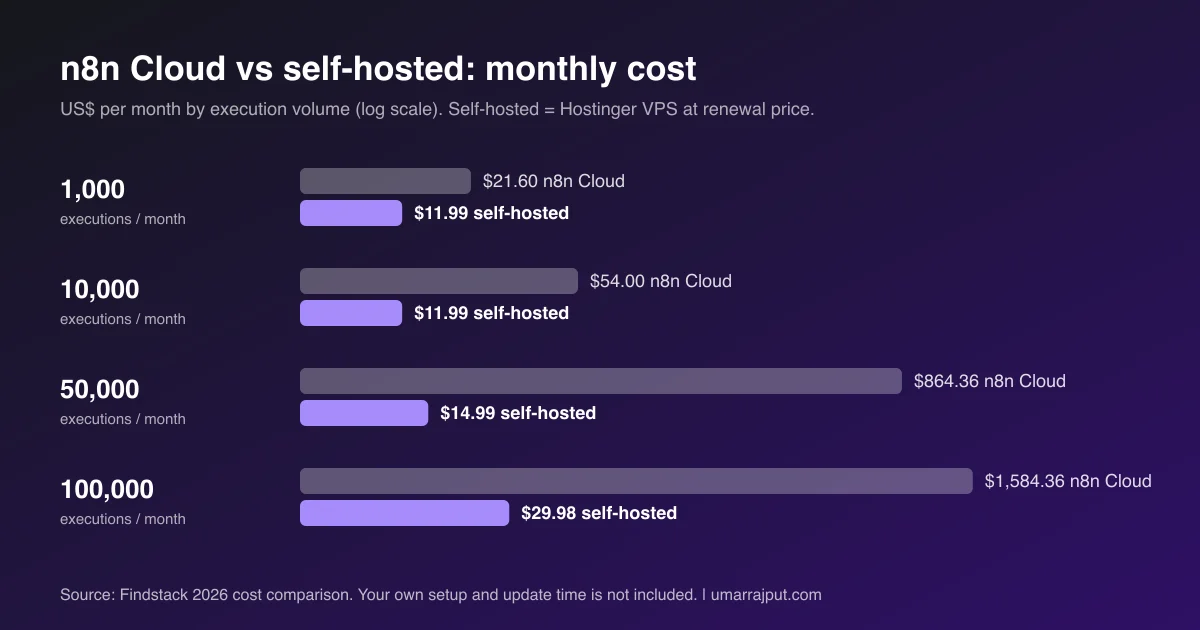
Self-hosting n8n is cheaper than n8n Cloud once you pass about 10,000 executions a month, and the gap grows fast after that. Below 10,000, n8n Cloud often wins once you count the hours spent on updates and backups. Above 25,000, a VPS beats Cloud by hundreds of dollars a month.
| Monthly executions | n8n Cloud | Self-hosted VPS | Monthly difference |
|---|---|---|---|
| 1,000 | $21.60 (Starter) | $11.99 | $9.61 |
| 10,000 | $54.00 (Pro) | $11.99 | $42.01 |
| 50,000 | $864.36 (Business) | $14.99 | $849.37 |
| 100,000 | $1,584.36 | $29.98 (two servers, queue mode) | $1,554.38 |
Figures from a 2026 Findstack cost comparison using Hostinger's renewal prices, with euro prices converted to dollars. On Hostinger's intro pricing, the self-hosted column is even lower. Count your own time too: around two to four hours to set up, and about 30 minutes a month to keep updated.
Which n8n hosting should you choose?
Choose by your skill level and execution volume. Hostinger is the best fit for most people because it balances price, RAM and easy setup. Contabo suits tight budgets with Linux skills, DigitalOcean suits developers planning to scale, and n8n Cloud suits anyone who never wants to manage a server.
| If you are... | Choose |
|---|---|
| New to servers and want n8n running today | Hostinger KVM 2 |
| Running AI agents or queue mode | Hostinger KVM 4 |
| Comfortable with Docker and want the lowest bill | Contabo |
| A developer who wants managed databases | DigitalOcean |
| Needing queue mode without running Redis yourself | Railway |
| A business owner who never wants to patch a server | n8n Cloud |
| Unable to pay in dollars | A Pakistani VPS |
Need n8n set up for your business?
I am Umar Rajput, a web developer and automation specialist. I have delivered more than 99 projects for 15+ clients across 6 countries, and I build lead capture and WhatsApp automation for businesses in Pakistan, the Gulf, the UK and the US.
Automation logic is something I build into my own products too. Clientdesk, my agency CRM, has a visual automation builder that assigns new leads and alerts a manager when nobody replies in 30 minutes.
If your automations need a fast site to send leads into, see my website development services in Pakistan, or my custom web development work for app-level integrations. You can also compare fixed price packages and pricing or read more about how I work.
Want n8n set up properly, once? Tell me what you want to automate and you will get a fixed quote covering hosting, setup, backups and your first workflows.
Disclosure: the Hostinger links are affiliate links. I may earn a commission at no extra cost to you.
Frequently asked questions
What is the best web hosting for n8n?
The best web hosting for n8n for most people is Hostinger's KVM 2 VPS, with 2 vCPUs, 8 GB of RAM and a one-click n8n template for $8.79 a month on a 24 month term.
Which Hostinger plan is best for n8n?
Hostinger KVM 2 is the best plan for most n8n users. KVM 1 works for learning, and KVM 4 with 16 GB of RAM suits queue mode and heavy AI workflows.
Can I host n8n on shared hosting?
Not reliably. n8n needs a process that runs all the time to fire schedules and catch webhooks, and shared hosting stops long running processes, so a VPS or n8n Cloud is the safer choice.
How much RAM does n8n need?
n8n needs 2 GB of RAM to run and 4 GB to run reliably, with 8 GB recommended for AI agents, large files or queue mode. Memory matters more than CPU for n8n.
Is n8n free to self host?
Yes. The n8n Community Edition is free to self host with unlimited workflows and executions, so you only pay for the server. Paid plans add features like SSO and version control.
Do I need Docker to run n8n on a VPS?
Docker is not strictly required, but it is the method n8n recommends for production, and most one-click n8n templates, including Hostinger's, run n8n inside Docker.
Is n8n Cloud cheaper than self hosting?
n8n Cloud is often cheaper below about 10,000 executions a month once you count your time. Above roughly 25,000 executions a month, self hosting on a VPS costs far less.
Can I migrate my n8n workflows to a new host?
Yes. Export workflows and credentials with the n8n command line, import them on the new server, and keep the same encryption key if you copy the n8n data folder instead.